Software Packaging with WinRepo-NG
Summary
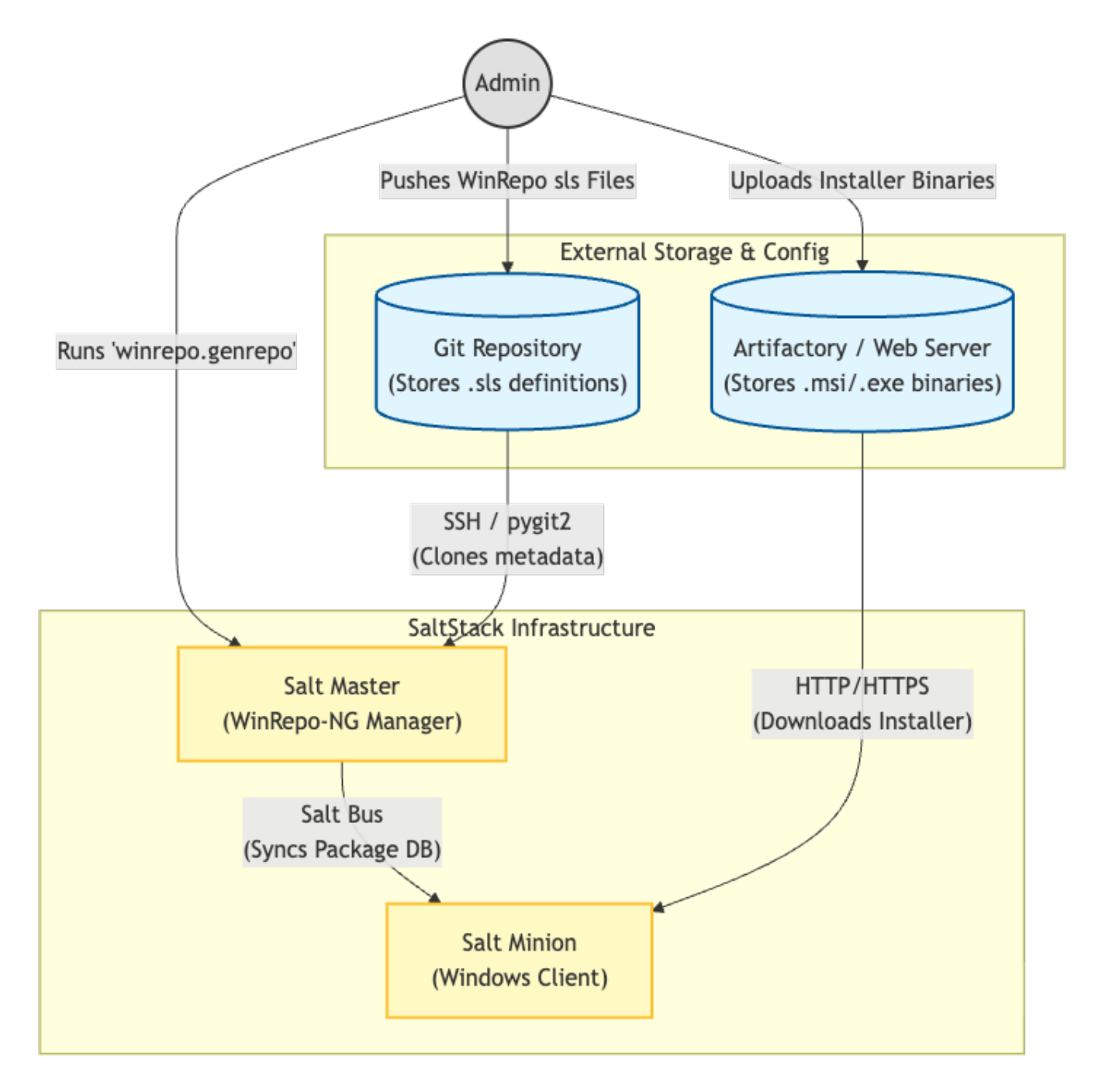
This guide explains how to configure WinRepo-NG on a Salt master to deploy custom Windows software using Salt’s native pkg.* states.
Installer binaries are hosted externally (for example in Artifactory), while package metadata is managed in a Git repository. This separates binary distribution from configuration logic and allows software deployment to be version-controlled, repeatable, and environment-aware.
High-level Process:
-
Upload installer binaries to Artifactory or an HTTP-accessible repository.
-
Configure the Salt master to use WinRepo-NG.
-
Store WinRepo package definition files (
*.sls) in Git. -
Regenerate the WinRepo metadata database.
-
Use
pkg.*states to install or remove software.
Flow diagram
Architecture Overview
WinRepo-NG separates responsibilities:
-
Binary distribution: HTTP repository (Artifactory)
-
Package metadata: Git repository
-
Deployment logic: Salt states
-
Execution: Salt minions
This separation allows:
-
Centralised version control
-
Controlled promotion across environments
-
Clear auditability of software changes
Detailed setup
Binary file distribution (Artifactory)
There must be a centralised location where Salt minions fetch installer binaries.
In production this will typically be something like Artifactory. In a lab environment, an NGINX web server is used to simulate the same HTTP directory structure as Artifactory.
Configure Salt master
Create winrepo.conf file
Create a new configuration file on the Salt master:/etc/salt/master.d/winrepo.conf
winrepo_dir_ng: /srv/salt/win/repo-ng

# Winrepo-ng settings
winrepo_provider: pygit2
winrepo_branch: main

# Turn off the legacy HTTP winrepo
winrepo_remotes: []

# Point NG at your SSH repo of package definitions
winrepo_remotes_ng:
  - git@github.com:<USERNAME>/<REPO NAME>.git

# SSH key for winrepo-ng
winrepo_pubkey: <PATH TO PUBLIC KEY>
winrepo_privkey: <PATH TO PRIVATE KEY>

# Cache file
winrepo_cachefile: 'winrepo.p'
Restart Salt master to load the config:
systemctl restart salt-master
Create the winrepo required directories:
winrepo_dir_ng is a local cache directory on the Salt master where WinRepo-NG clones and renders package metadata.
It is only a local cache location and does not need to mirror the Git repository structure.
mkdir -p /srv/salt/win/repo-ng
Create software package definition files (WinRepo)
Each software component needs a WinRepo definition file. Place these files in your git repo.
WinRepo-NG recursively scans the configured git repository for windows/*.sls files. The top-level directory name (for example repo-ng/) is arbitrary and does not need to match winrepo_dir_ng
Sample git repository directory structure:
- repo-ng:
  - windows:
    - 7zip.sls
    - Firefox.sls
Here is an example /repo-ng/windows/7zip.sls package:
# Name of software, this is referenced when you request an install in a normal state file
7zip:
  {% set base = 'https://<URL to Fileserver/Artifactory dir>' %}

  # Version number for targeted installs
  # Note: Must match the exact MSI product version number
  '25.01.00.0':
    installer: '{{ base }}/25.01/7z2501-x64.msi'
    # the 'full_name' string must match the application name as listed in the Name column of the Add/Remove Programs control panel (Appwiz.cpl)
    # This name is used to check the success of the software install
    full_name: '7-Zip 25.01 (x64 edition)'
    reboot: False
    # When set to true this wraps the installer file in 'msiexec /i' and 'msiexec /x' for install and uninstall commands.
    msiexec: True
    # You can add extra custom flags that the software install supports here.
    install_flags: '/quiet /norestart'
    uninstall_flags: '/quiet /norestart'
Note that the directory structure used in the installer: URL must resolve to a direct HTTP link to the file. You can test it by building the path manually and then using curl or wget to retrieve it from a test minion machine.
Rebuild the WinRepo metadata
After creating or modifying WinRepo definitions, run the following on the master to refresh from git and then regenerate the repo.
salt-run winrepo.update_git_repos
salt-run winrepo.genrepo
You must also force a refresh on any existing minions that you want to target with any new software definitions:
salt 'existing-minion-id' pkg.refresh_db
Verify the new package definitions are available to minions.
Run the following command on a test minion to verify the new packages are available
salt <minion> pkg.list_available
If the package does not appear, ensure:
-
winrepo.update_git_reposcompleted successfully -
winrepo.genreporan without errors -
The minion has refreshed its package database
Deploying Software in States
In your deployment state use the pkg abstraction layer module to install or remove software:
# Ensure 7zip is present at the specific version
install_7zip:
  pkg.installed:
    - name: 7zip
    - version: '25.01.00.0'
Notes:
- Remove the version: line if you want Salt to install the latest defined version.
- You can also install directly from the command line using:
salt 'win-test' pkg.install 7zip
This allows software deployment to remain abstracted from installer mechanics.